
[ News | Links | Products | We want your input ]
miroVIDEO 
|
|
Technical Data |
|
| Adapter | Plug and Play 32-bit PCI board with bus mastering |
| IEEE 1394 Connectors | 2 external, 1 internal |
| Cable | 4 to 6 pin 1394 PC to DV device |
| Video Format | DV, digital component 720 x 480, YUV 4:1:1, 30 fps (NTSC) 720 x 576, YUV 4:2:0, 25 fps (PAL) |
| Data rate | Video 25 Mbps, Audio 1.5 Mbps |
| Compatibility | i.LINK IEEE 1394 standard, Sony DCR VX-1000, DCR VX-700 and DCR PC7, 100% compatible with miroVIDEO DC30 plus, miroMOTION DC30 |
| Operating system | Windows 95, NT 2.5 or higher, MacOS 7.5.3 or higher |
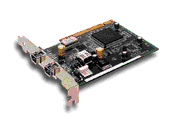
DV300 is not yet available, but has already created a buzz around DV town. If released on schedule (January 1998), we are sure it will be a major hit. On Windows platform, there is no competition for it today - at least not in its price range. Main features:
- Frame accurate DV device control
- Sony software CODEC
- Multi-pass lossless capture
- Instant Video plug-in for Adobe Premiere
- On-board Ultra Wide SCSI
- USD $799 (list price)
Device Control - allows to frame accurately capture clips and then frame accurately "print to tape" at a designated place.
Multi-pass lossless capture - if a frame (or two) are dropped at capture, DV300 automatically makes a second pass to make the captured video flawless. This great feature that would have been even greater if it allowed for automatic frames-accurate inserts of dropped frames on playback. We wish... but we also understand that it isn't just a software issue - if a DV camcorder or VTR can't do frame accurate inserts, the software can't to it either. Thanks to Pinnacle for thinking about "lossless" capture, and let's hope that someday we will have a "lossless" print-to-tape as well.
On-board SCSI. DV-300 is physically Adaptec's AHA-8945, which is a combo of AHA-8940 and AHA-2940UW on a single board. Pinnacle supplies the software (codec, device control, tools), and it is the software that makes makes DV300 a strong product.
The trick: the picture of the board shown here is the "original" and "confidential" DV3001 that appears to have no SCSI connectors. The current board, as per DV300 Press Release, is supposed to have Ultra-Wide SCSI, and I am surprised that Pinnacle was able to keep the price the same as they originally promised - $799.
Pinnacle Systems also published an interesting Competitive
Analysis Matrix, where DV300 is compared to Fast DV-Master, DPS Spark, Radius MotoDV
and Draco Casablanca. Certain points made me raise my eyebrows:
Analog I/O - w/DC30plus - implies that it is a
real-time analog capture into DV format. It is not.
Drops Frames on Capture - No
for DV300, Yes for everybody else -
implies that DV300 competitors always drop frames, and that DV300
eliminates such a possibility completely, with its MultiPass feature. Well,
if I were Pinnacle, I'd say that MultiPass is a very
nice feature allowing fully automatic re-capture of dropped frames, but in no way
affecting the fact of the dropped frames itself. In other words:
frames may or may not drop - on all systems, DV300 included. With its MultiPass
DV300 goes back and re-captures those dropped frames, while everybody
else just tells you that you missed some. In a sense, it can be called a 100%
guaranteed capture.
Device control - Frame Accurate for DV300, Limited or None
for all others. In our opinion, DV-Master's existing device control is quite as good
as DV300 promises.
See also: Pinnacle's DV300 Data Sheet.
Pinnacle exhibited at COMDEX Fall'97and was nominated a finalist in BYTE magazine's 'Best of Show Awards'. Congratulations!
[ News | Links | Products | We want your input ]
1 The trick. About mid-October, several people noticed a strange phenomenon on a miro web site. There was a blinking "confidential" button that once pressed, generated an "employee" login box. You could click <Cancel>, or press <Enter>, or type in your favorite love song, the result would have been the same - after a "Password invalid. Access denied" error message, you were at the DV300 confidential "employee only" web site!
The site listed DV300 features, employee bulletin board, bug list, and how many days left before a product launch. December 8th was the "confidential" launch date, now officially January of 1998. Below you will find features listed at the "confidential site" (which does not seem to be available any longer) and you will see that the current SCSI feature is not yet mentioned.
| Auto scene scanning | miroVIDEO DVTools can automatically scan the DV tape and find scene in and out points. During the scanning process scene locations with timecode are stored in a database. |
| Camera control | Camera control is provided with a controller window to edit individual scene in and out points. |
| Previewing tapes to select clips | The camera controller allows for scene previewing before downloading any data. |
| Downloading clips or groups of clips | The DV 300 board can be used to capture clips into one or multiple AVI files for editing in Adobe Premiere. |
| No dropped frames | During the capture all frames are captured regardless of host performance issues. miroVIDEO DVTools use a multipass approach to capture the frames which were not stored during the first download. |
| Editing DV production | Scenes in the Capture Gallery can be individually trimmed and edited for future download |
| Simple Capture Gallery | The Capture Gallery is an easy to understand organizer for your video clips. Each clip is defined by the first frame of the video sequence. By double clicking on the picture the clip can be viewed and trimmed or lengthened. |
| Video footage archiving | miroVIDEO DVTools provides a camera controller interface for frame accurately controlling your camcorder. During the scanning process the control feature is used store all scenes in a tape and clip database for future use. |
| Drag and drop editing | Once your tape has been scanned reference pictures can be dragged from the tape gallery and dropped into the Capture Gallery. Clips can be inserted, copied, deleted or moved within the Capture Gallery's timeline. |
| High quality still image capture | Use the DV 300 to capture still images from your DV camera. The DV 300 applies a high quality de-interlacing algorithm for the best quality still image. |
| Uploading finished products to your DV device | When a production is finished you can Print-to-Tape back to the camera through the 1394 link. The upload can be done either from DVTools or from Adobe Premiere. |
| Warranty | The miroVIDEO DV 300 includes a two-year warranty on all parts and labor. |
We must congratulate Pinnacle on a devilishly clever marketing campaign.
Last updated December 19, 2023